

Most users believe that reverse video search and reverse image search are the same techniques. Although both aim to locate visually similar, duplicate, and reused content online, their processes, inputs, and outcomes differ significantly.
Reverse image search is meant to find visually similar images or screenshots, whereas reverse video lookup is about finding reused, duplicate, or original videos on the web. Both methods serve different purposes, so the better option depends on whether you want to verify a complete video or a single screenshot.
In this article, we’ll compare the two techniques so you can choose the option that best suits your requirements.
What Is Reverse Video Search?
Have you ever seen a video and thought where else it might have been posted? Searching with keywords won't always help. The reverse video search method is designed for exactly this purpose. Depending on the tool, users can upload a video or paste its URL to find visually similar videos and related matches online.
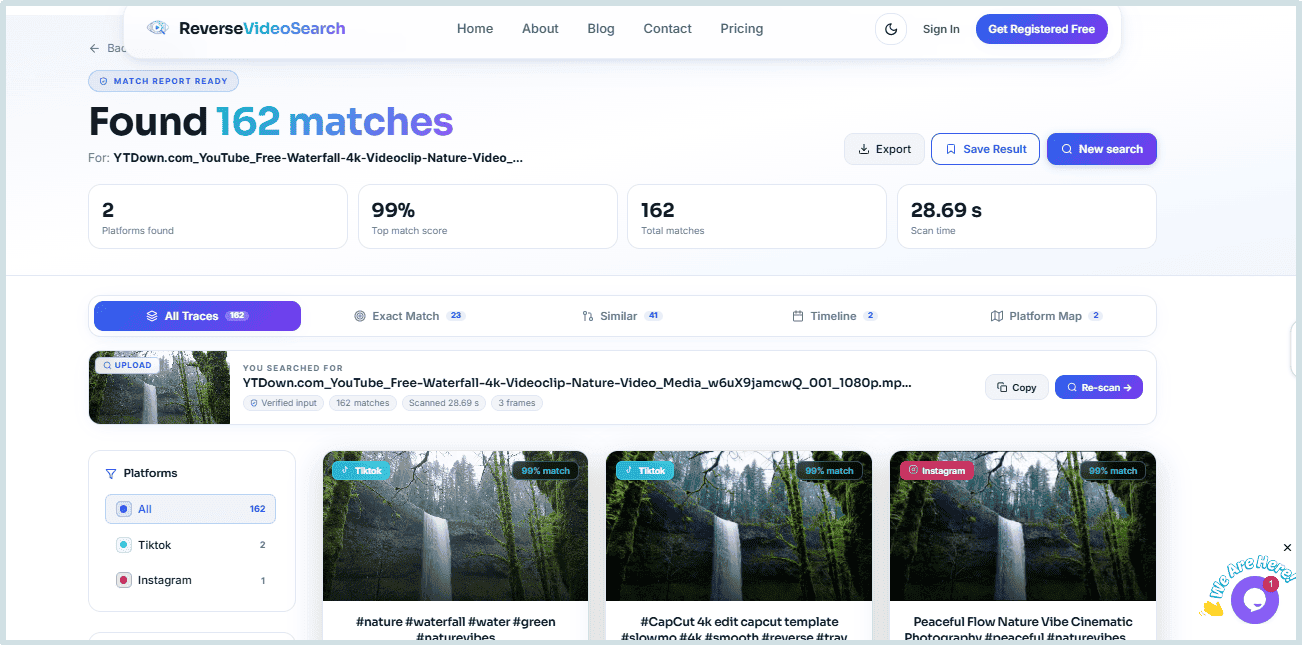
Many AI-powered reverse video search tools don't rely on just a single screenshot. Before searching for related content, they analyze multiple keyframes or segments of the video. One example is reverse-videosearch.com, which allows users to upload a video or paste its URL to start the search.
To give you a comprehensive idea about the reverse video search technique, let’s see how it works in a reverse video search tool. For this, we uploaded a short clip into the tool and started the search. The tool instantly found relevant clips from different platforms and listed all of them in front of us.
What Is Reverse Image Search?
Sometimes, a single screenshot is enough to verify online content. If you have just a screenshot or a thumbnail available, its authenticity can also be checked. The role of reverse image search starts from here. This technique analyzes the uploaded image or a screenshot and searches for similar images and related web pages on the internet.
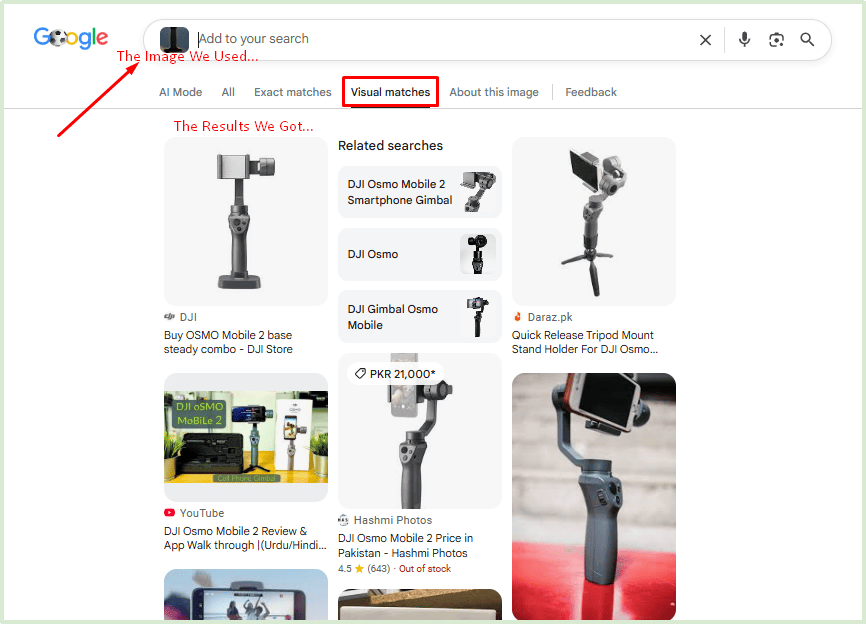
It helps users find copied thumbnails, reused images, and the earliest publicly indexed versions of an image. One popular example is Google Lens. Users can either upload an image or drag & drop it into the search box to start a search.
To better understand how reverse image search works, we uploaded an image to Google Lens and started the search. Within seconds, the tool provided us with visually similar pictures from the internet. Plus, it delivered the web pages where the image or related versions appeared. This made it easy to identify reused content, locate similar images, and discover websites containing the same or related visuals.
Reverse Video Search vs Reverse Image Search
Both approaches are useful, but for different purposes. You can easily understand which choice is best for each scenario by looking at the comparison below.
|
Feature |
Reverse Video Search |
Reverse Image Search |
|
Input |
Complete video or video URL |
Image, thumbnail, or screenshot |
|
Can analyze a complete video |
Yes ✔️ |
No ❌ |
|
Works with screenshots |
Some tools ✔️ |
Yes ✔️ |
|
Best For |
Identifying video source, reposted videos, and originality check |
Verifying copied images, thumbnails, and image sources |
|
Results |
Visually similar or matching videos |
Matching images & related web pages |
|
Example Tools |
Reverse Video Search Tool |
Google Lens |
As the comparison shows, both methods have their own use cases. The better choice simply depends on whether you have a complete video or just a screenshot.
Which One Should You Use?
Still confused about which one to use? The type of content you have—not the tool itself—determines which option is more suitable.
Reverse video search could be more suitable if:
-
You have a complete video or its URL.
-
You want to verify the originality of a video.
-
You're trying to find reposted or copied versions.
-
You need to search for similar videos across different platforms.
Reverse image search could be a better choice if:
-
You only have a screenshot, thumbnail, or image.
-
You want to check if a photo or thumbnail has been used before.
-
You're looking for an image's source.
-
You need to explore similar images or related web pages.
If both the video and its screenshot are available, trying both methods can improve the search results. Some advanced tools, such as the Reverse Video Search Tool, support both video and image uploads. For hands-on steps, check our step-by-step guide to using the tool.
Conclusion
For each situation, reverse video search and reverse image search may not be equally suitable. Both methods have their own purpose, and understanding their strengths can help you get more relevant search results.
Understanding the difference between these two techniques makes it easier to verify online content, spot reposted material, and help identify the earliest publicly indexed source. Selecting the appropriate method according to your needs can save time and help you get more relevant results.
Some advanced tools also support different types of inputs, like videos, images, and screenshots, which makes the verification process more flexible. Ultimately, the ideal choice depends on the type of content you want to verify.
FAQs
1. What differentiates reverse video search from reverse image search?
While reverse image search helps look at photos, screenshots, and thumbnails, reverse video search is used to locate or identify entire videos.
2. Can I use a screenshot for reverse video search?
Yes, some advanced tools support both videos and images. But if you have just an image available, a reverse image search can be a better choice.
3. Is reverse video search free to use?
It depends on the tool. Some platforms provide free features, while others offer paid plans for advanced features.
4. Which approach should I start with?
Reverse video search would be preferred if you have a full video. A reverse image search, however, would be a better option if you only have a screenshot or thumbnail.