
Conducting a reverse video search is an important skill to know if you are a social media content creator, content strategist, or a researcher.
This term ‘reverse search’ can sound a little bit technical. But Reverse Video Search has made it a lot easier. Our free platform is designed to help you research the original source of a video and find a context within a matter of seconds. With just a few steps, you can find out where the original video was published, who posted it, and what the context behind it was.
In this guide, you will learn what the Reverse Video Search tool actually is, what it does, and how you can use it.
Let’s start.
What is the Reverse Video Search Tool?
The Reverse Video Search is an online tool designed to help you conduct a reverse search on the Internet and find originally published video. You can use this tool to see where a trending video is actually originating from and what the context was behind it.
This tool offers different methods for conducting this search.
You can upload an entire video, attach a screenshot of any frame, or add a URL to find the original video. The tool also allows you to search for original posts by using specific keywords, such as “the dancing cat” or “why are you running meme”.
The tool will take a few seconds to find the original video for you. Besides digging up the source and context, the Reverse Video Search tool gives similar videos as well. It’s a very useful feature in case you want to find similar content and post it online.
What are the Features of Reverse Video Search?
Reverse Video Search comes with several useful features. These features make tracing the original video source easy, efficient, and fast.
Here are the details of its major features:
Accurate source tracking
Our tool is designed to conduct video source tracking with 100% accuracy. It uses advanced AI and computer vision to analyze every single frame of a video to make sure the results are accurate.
Multiple search methods
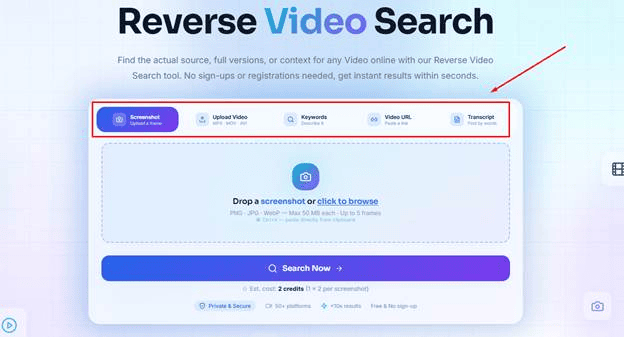
You can search for an original video by using different search methods. The tool offers the following options:
-
Search by video: Upload a video in different formats, such as MP4, MOV, AVI, to find the original source.
-
Search by screenshot: Use a screenshot of any frame of a video to find the original video.
-
Search by keywords: If you only remember the video in your mind, you can use keywords to describe it. The tool will find the original source for you.
-
Search by URL: Add the URL of a video to find the original and matching posts.
-
Search by transcript: You can paste the transcript of a video to find the original post.
Search on 50+ Platforms
With our advanced algorithms, the tool conducts deep research on more than 50 online platforms to find the original source and the context of the video. Some major platforms include:
-
Google
-
YouTube
-
X (Twitter)
-
Instagram
-
TikTok
-
Web
-
Dailymotion
And many more...
Super fast research
You can conduct your reverse video search in less than 10 seconds. Once you upload your file, the tool starts the research quickly and gives you the original video and matching results before you know it.
Freemium availability
The main features of the tool are available for free. You can use the screenshot, video upload, screenshot upload, and keyword search options for completely free. Once you create an account, you get free credits that can be used to conduct reverse video lookup with URL and transcript input methods.
However, these credits are limited for free users. This is why the tool has a premium version for people who want to conduct multiple searches on a daily basis.
No sign-up required
There’s no need to sign up for an account in order to use the Reverse Video Search tool. Just open it, enter your file or keyword, and start the search.
Save and export search results
You can save your search results in your profile to access them later. Besides this, the tool allows you to export the search report in a document file that contains details like the titles, URLs, and platforms of matching videos.
Safe & secure
We value privacy. This is why we have integrated advanced security protocols in the tool to make sure your videos and URLs remain safe with our tool. You can use it without worrying about a data leak.
How to Use Reverse Video Search?
Now that we have discussed what Reverse Video Search is and the features it offers, let’s discuss how you can actually use it.
Here’s a complete step-by-step guide that you can follow to use this tool:
Step #1. Upload your video (or other input method):
The first thing you have to do is upload your video (or any other input method).
-
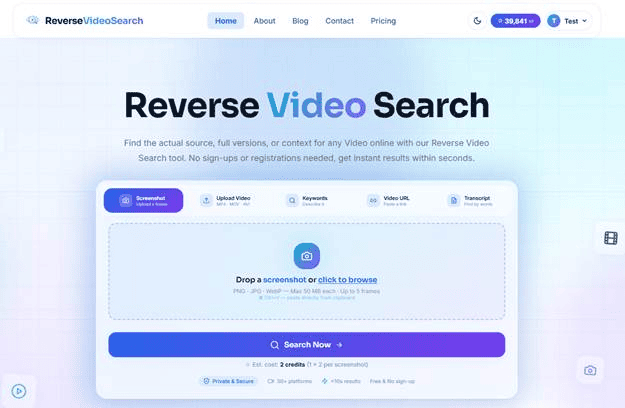
Open our tool’s homepage.
-
Select an input method.
-
Now, add the relevant input. For example, click on the “Drag & drop…” option to upload the video.
-
If you are using the keyword method, type your keywords or key phrases in the tool.
Step #2. Start the search:
-
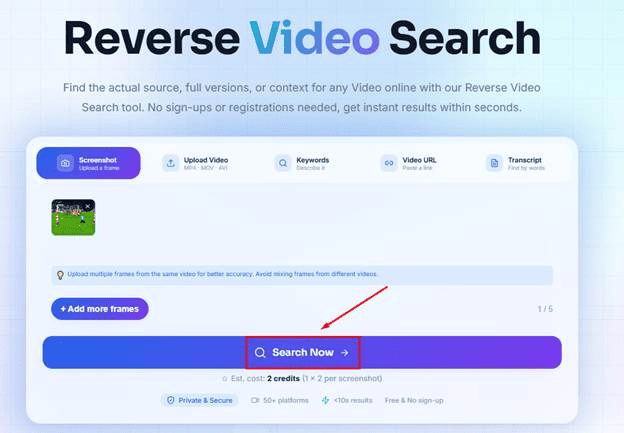
Once you have input your file, click on “Search Now”.
-
If you are using the free version, the tool will do a security check before starting the search.
-
If you are using the premium version, the research will start immediately without the security check.
Step #3. Get the original and matching videos
-
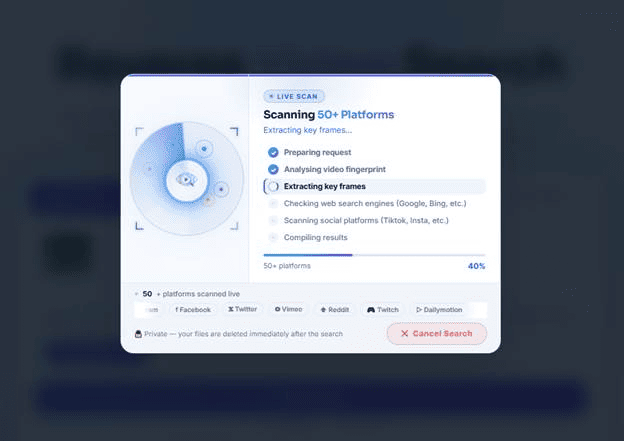
The tool will take a few seconds to complete the search.
-
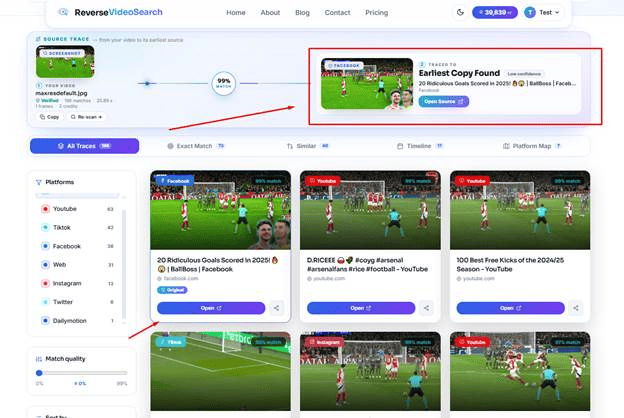
After this, it will give you the earliest copy of the video, along with matching results. You can browse all the results and open any video you want.
-
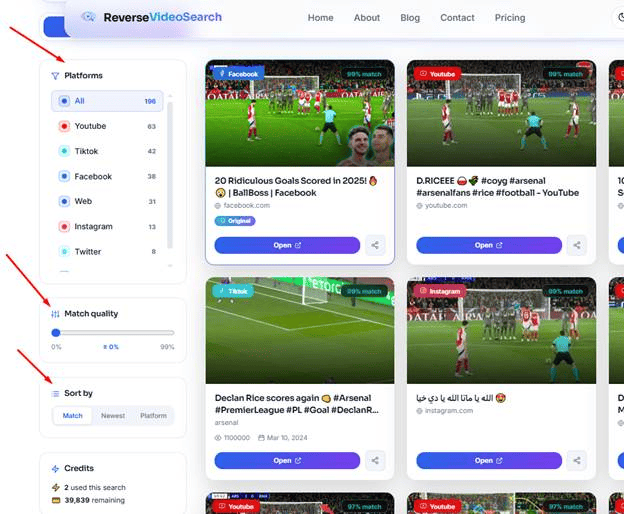
There are different filter options available, such as platform type and match quality, as well that you can use to find your target video more easily.
How Does Reverse Video Search Work?
We have discussed the usage method of this tool in detail above. Now, let’s take a look at the technical side of it.
The Reverse Video Search tool uses the latest Artificial Intelligence technology and computer vision to conduct the research. It is designed to analyze visual elements of the screenshot or video you provide.
It also analyzes motion patterns and key frames to fully analyze your input. After this, it conducts deep research on the Internet and finds the oldest matching video. As a result, you get the post that was originally published. This analysis also helps the tool to provide different matching videos from different platforms as well.
For URL inputs, the tool retrieves and analyzes your provided video. The same goes for keywords. It uses the keywords to visualize what type of video you’re trying to find.
After this, the original search method starts, where it finds the oldest matching video to fetch relevant results.
How to Use Reverse Video Search Efficiently?
Reverse Video Search is a very productive tool even if you use it as a basic user. However, there are some strategies you can follow to use this tool to its fullest potential. Here are some of the main ones:
Prioritize uploading a video
Although the tool is very efficient for all upload methods, using the video upload method is recommended. With this method, the tool can analyze multiple frames and a variety of visual elements.
This analysis helps the tool find the original source more accurately. The matching results are also very similar to the original post.
Use a long video
To get the best results, try to upload the longest video that you have. It will give the tool more data to analyze and find better matching results.
Use keywords that describe the video
Instead of adding vague words, try adding keywords that describe the video itself. For example, don’t add “football freekick Arsenal”. Instead, add something like “Declan Rice’s freekick against Real Madrid”.
It helps the tool visualize your video better and fetch accurate results.
Add clear screenshots
Blurry or low-quality screenshots are one of the most common reasons behind a failed reverse video search. This is why you should always add clear screenshots.
Use the Pro version
If you are a serious content creator or a content researcher, using the Pro version of the tool can do wonders for you. You get the option of uploading a URL or a transcript of the video.
The tool uses its advanced algorithms to analyze these inputs. Besides giving you the accurate original source, it gives you access to multiple matching videos as well that you can analyze.
Don’t forget to use filters
If you are looking for specific results, using filter options can be useful. You should use the tool’s following filter options to find the exact match:
-
Filter by platform
-
Filter by match quality
-
Sort results by the Match, Newest, and Platform options
-
Exact upload timeline of all the matching videos
-
Browse the exact match tab
Save results and export reports
If you are working on finding multiple video sources, saving search results and exporting the search reports is recommended. When you save the results, you can come back later and explore them at any time. You can save the exported search report in the form of a document or share it with anyone.
How to Register for an Account on Reverse Video Search?
Registering an account on Reverse Video Search comes with some useful benefits. It gives you 3 free searches every day, and you can save your search results in your profile.
Here’s how you can register an account here:
-
Open the homepage of our website.
-
Click on “Get Registered Free”.
-
Now, enter your full name, email address, and a password.
-
Click on “Create Free Account”.
-
Your account will be registered.
-
The tool also gives you the option of registering an account through your Google, Microsoft, or LinkedIn account as well.
Final Thoughts
Well, there you have it. Reverse Video Search is one of the best resources you can use to find original videos and know the context behind them. Its usage procedure is super easy. You get multiple input options. Pick any option and add your input.
After this, the tool does its job and fetches your required results. To use it more efficiently, always prioritize the video input method. Also, add clearer screenshots and use descriptive keywords to find better results. And if you want to take the research to another level, go for the Pro version. Want more ways to safeguard your content? Explore our guide to tools for protecting video content.
Frequently Asked Questions (FAQs):
Is the Reverse Search Video tool free to use?
The Reverse Search Video tool is freemium. You get 3 free searches every day. After that, you will have to purchase its premium version for further research.
What type of keywords should I add to find the video?
You should add long-tail keywords to find a relevant video. It gives the tool more data to visualize your video and find matching results.
Can I use the URL upload method for free?
Yes. You can use the tool’s URL upload method for free by creating an account.
Is this tool accurate?
Absolutely. The Reverse Video Search tool is extremely accurate. However, there is sometimes a possibility of errors for different reasons. For example, if you input a low-quality video or the original video is not available online anymore, the tool may not find the exact match.
What is the best method to conduct a reverse search on this tool?
Uploading a video is the best method. With this method, the tool can analyze multiple frames and patterns to find highly matching results. If a screenshot is all you have, reverse video search vs. reverse image search breaks down into which approach works best.
What type of video and screenshot formats can I upload?
For videos, you can upload MP4, MOV, AVI, MKV, and WebM formats. The compatible formats for screenshots include PNG, JPG, and WebP.